Showing posts with label CGRectGetMinX. Show all posts

Thursday, August 25, 2011

How to divide a CGRect using CGRectDivide


 If you have a rectangle and you want to cut a slice of 40 px from the bottom edge. Following code will solve your problem. In the output,you will get dimension of your slice rectangle as well as reminder rectangle. Note: You can change the pixel amount (40 px) of your slice to any valid number of pixel and also change the edge to either of CGRectMinXEdge,CGRectMaxXEdge,CGRectMinYEdge,CGRectMaxYEdge


    CGRect b=CGRectMake(40, 50, 240, 150);
    
    
    CGRect remainder, slice;
    CGRectDivide(b, &slice, &remainder, 40, CGRectMaxYEdge);

    NSLog(@"(%.0f,%.0f,%.0f,%.0f)",CGRectGetMinX(remainder),CGRectGetMinY(remainder),CGRectGetWidth(remainder),CGRectGetHeight(remainder));
//It will give output= (40,50,240,110)

    NSLog(@"(%.0f,%.0f,%.0f,%.0f)",CGRectGetMinX(slice),CGRectGetMinY(slice),CGRectGetWidth(slice),CGRectGetHeight(slice));
//It will give output=(40,160,240,40)


If this is not what you were looking for CGRect, try this comprehensive LIST.

Find intersecting area of 2 CGRects


If you have 2 rectangles overlapping each other and you want to find the area of the intersecting area which is shown in the picture with checks pattern. You can find width and height of intersection area. Since area is a rectangle, you can simply do width x height.

       CGRect b=CGRectMake(40, 50, 240, 150);
    CGRect c=CGRectMake(100, 125, 80, 275);
    
    
     CGRect i=CGRectIntersection(c, b);
    
    NSLog(@"(%.0f,%.0f,%.0f,%.0f)",CGRectGetMinX(i),CGRectGetWidth(i),CGRectGetMinY(i),CGRectGetHeight(i));


If this is not what you were looking for CGRect, try this comprehensive LIST.

CGRect contains another CGRect


 If you have 2 rectangles and you want to find out if one rectangle is inside the other, following code will do:

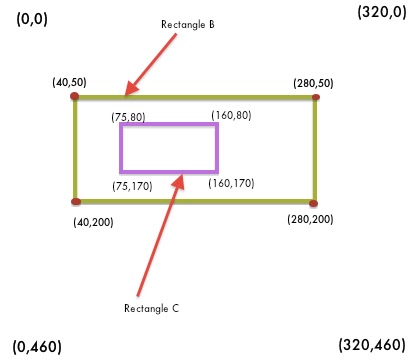
     CGRect b=CGRectMake(40, 50, 240, 150);
    CGRect c=CGRectMake(75, 80, 85, 90);
    
    BOOL contains=CGRectContainsRect(b, c);
    BOOL contains1=CGRectContainsRect(c, b);
    
    if(contains) NSLog(@"yes"); else NSLog(@"no");
    //This will print yes because b contains c. 
    //NOTE: c should be completely inside b.
    
    
    if(contains1) NSLog(@"yes");else NSLog(@"no");
    //This will print no because b doesn't contain c


If this is not what you were looking for CGRect, try this comprehensive LIST.

CGRect intersects another CGRect


If we have 2 rectangles and we want to find out if they intersect, then we can do with following code:

       CGRect b=CGRectMake(40, 50, 280, 200);
    CGRect c=CGRectMake(100, 125, 80, 275);
        
   
    BOOL contains=CGRectIntersectsRect(b, c);
    
    if(contains) NSLog(@"yes"); else NSLog(@"no");
    //This will print yes because b overlaps rect c and viceversa


If this is not what you were looking for CGRect, try this comprehensive LIST.


Find if CGRect contains a point


So we have a point P(200,60) inside the rect and another point O(200,400) outside the rectangle. Now we want to find it out using iPhone code. Following is how we do it


       CGRect b=CGRectMake(40, 50, 280, 200);
    CGPoint p=CGPointMake(200, 60);
    CGPoint o=CGPointMake(200, 400);
    
    BOOL contains=CGRectContainsPoint(b, p);
    BOOL contains1=CGRectContainsPoint(b, o);
    
    if(contains) NSLog(@"yes"); else NSLog(@"no");
    //This will print yes because p is inside rect b
    
    
    if(contains1) NSLog(@"yes");else NSLog(@"no");
    //This will print no because o is inside rect b


If this is not what you were looking for CGRect, try this comprehensive LIST.


iPhone Find CGRect Coordinates.

If you want to find out the top left, top right, bottom left and bottom right coordinates of your CGRect. Following is how you do it.


    CGRect b=CGRectMake(40, 50, 240, 150);
    //top left
    float topLX=CGRectGetMinX(b);
    float topLY=CGRectGetMinY(b);
    
    NSLog(@"(%f,%f)",topLX,topLY);
  
    //top right
    float topRX=CGRectGetMaxX(b);
    float topRY=CGRectGetMinY(b);
    
    NSLog(@"(%f,%f)",topRX,topRY);
    
    //bottom left
    float bottomLX=CGRectGetMinX(b);
    float bottomLY=CGRectGetMaxY(b);
    
    NSLog(@"(%f,%f)",bottomLX,bottomLY);
  
    //bottom right
    float bottomRX=CGRectGetMaxX(b);
    float bottomRY=CGRectGetMaxY(b);
    
    NSLog(@"(%f,%f)",bottomRX,bottomRY);


It will print following results


top left (40.000000,50.000000)
top right (280.000000,50.000000)
bottom left (40.000000,200.000000)
bottom right (280.000000,200.000000)


If this is not what you were looking for CGRect, try this comprehensive LIST.

iPhone CGRectMake Example

Lets say I have CGRect on my iPhone screen as shown below in the screenshot with origin on the top left as usual. First question: How to create a rectangle using iPhone SDK. Code snippet is given below.


   CGRect b=CGRectMake(40, 50, 240, 150);


Now what all information I can extract from it using iPhone SDK. You can find info/code in following articles.


1. Find Height and Width of CGRect.


2. Find All Coordinates of CGRect


3. Find if CGRect contains a point


4.Find if a CGRect intersects another CGRect


5.Find if  a CGRect contains another CGRect


6. Find intersecting area of 2 CGRects


7.How to divide a CGRect using CGRectDivide